SIM Info Tab
The SIM Info tab is the default screen that is displayed when you select a SIM from athe SIM table. This screen provides comprehensive details about the activities and status for a selected SIM.
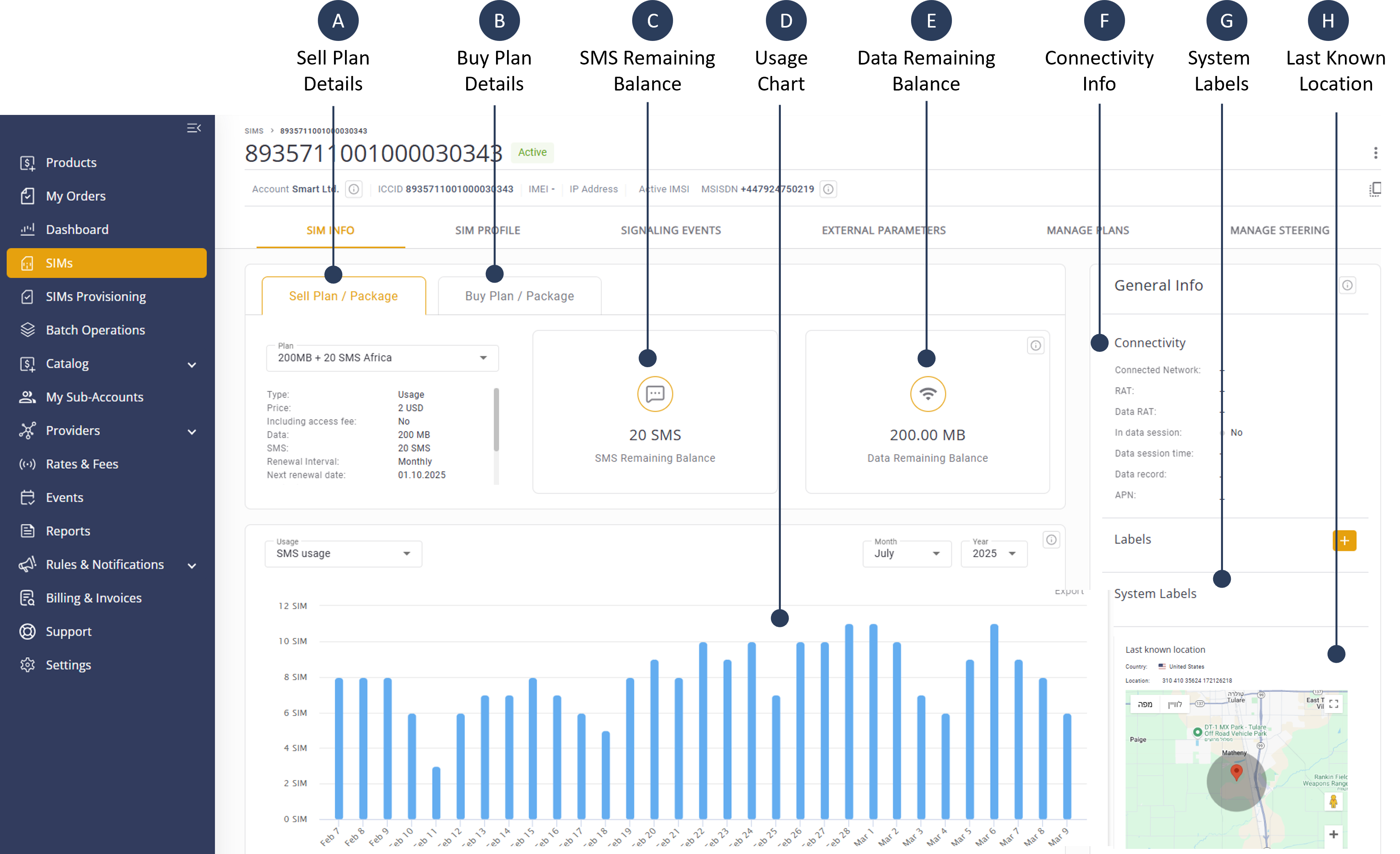
A description of the SIM Info content is provided in this table.
| Panel Name | Description |
|---|---|
| Sell Plan | Display relevant SIM info details for your Sell Plans |
| Buy Plan | Display relevant SIM info details for your Buy Plans |
| SMS Remaining Balance |
The number of SMS messages left for a SIM to use. It shows how much is still available from the total limit before it runs out. NOTE: The term "Remaining Balance" is used exclusively for Prepaid Plans only (e.g. Usage and Money). When a Rate Plan is displayed the term "Current Usage" is displayed. |
| Data Remaining Balance |
The amount of data (megabytes) left for a SIM to use. It shows how much is still available from the total limit before it runs out. NOTE: When the remaining data for a prepaid Usage Plan falls to 0.02 MB (20 KB) or below, the CMP displaysan "Out-of-Balance" notification. This means that balances below this threshold will prevent new data sessions. |
| Connectivity Info |
Connectivity info includes these details:
|
| System Labels | Displays the the labels assigned to the selected SIM. You can click +Add New to add a new label. |
| Usage Chart | Displays the daily usage of SMS or Data for the specified month and year. |
| Last Known Location |
NOTE: Several external factors can influence the accuracy of the last connected location, including (a) the device's receiver and location, (b) transmission interference from atmospheric sources, and (c) obstruction or reflection of location services from nearby structures. Additionally, as geolocation data is crowd-sourced, it may sometimes contain unintentional deviations. |
SIM Info Header
The SIM Info header contains detailed information for a selected SIM. An example of the SIM Info header is shown here.
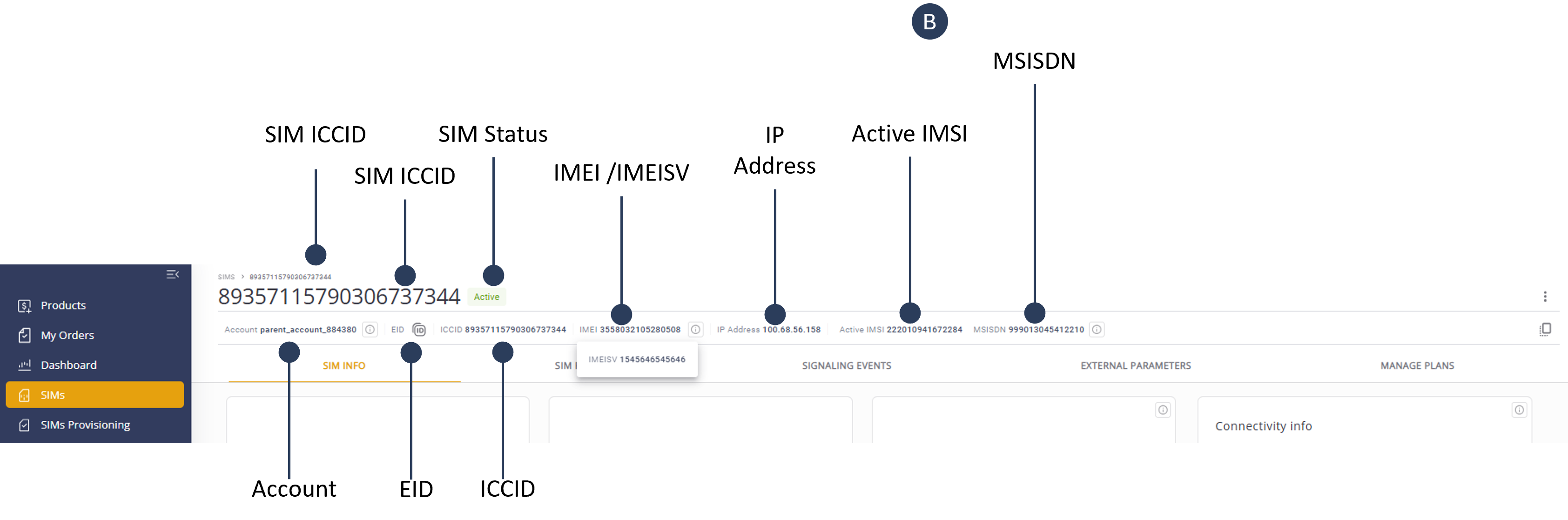
A description of the SIM Info header is provided in this table.
| Field Name | Description |
|---|---|
| SIM ICCID | The unique identifier for each SIM card. |
| Account Name | The name of the account associated with the SIM card. |
| SIM Alias | A user-defined name for the SIM card. |
| SIM Status | The current status of the SIM card (Inactive, Active, Suspended, Suspended - Locked SIM, Terminated |
| IMEI /IMEISV | The International Mobile Equipment Identity number of the device (including software version) using the SIM. |
| IP Address | the last IP address allocated to the SIM from the core Packet Gateway (PGW). |
| Active SIM | Indicates the last activated IMSI/MSISDN. |
| IMSI | The IMSI uniquely identifies the SIM card within the mobile network. The SIM must be active to view the IMSI/MSISDN pairings. For eUICC SIMs, the IMSI/MSISDN pairings are shown only for the currently active profile |
| MSISDN | The Mobile Station International Subscriber Directory Number, which is the phone number associated with the SIM card |
| IMSI Provider Alias | The IMSI Provider name. |
| SIM Actions | Actions that can be performed on the SIM card, such as activation, deactivation, or modification. |
| Copy to clipboard | An option to copy the displayed SIM information to the clipboard. |
SIM Card Attributes
A description of the SIM Card Attributes is provided in this table.
| Attribute Name | Description |
|---|---|
| SIM Type |
Defines the operating system installed on the secure element (where applicable).
|
| Manufacturer | Identifies the SIM card vendor. (numeric IDs map to specific companies). |
| Element |
Defines the type of secure element provided:
|
| Activation Type |
Type/method of profile delivery for eUICC SIMs (only if OS is eUICC):
Note: SM profile types are incompatible with UICC OS. |
| Form Factor |
Physical format/size of the secure element (applies to Plastic and Embedded elements):
|
| Grade |
Durability and environmental resilience:
|
| Applet Version | Specifies the version of the applet installed on the SIM; used to track features and compatibility. |
| Multi IMSI | Yes/No – Indicates whether the profile (ICCID) has more than one IMSI. |